
I used Post Planner for two years to schedule content across up to ten Facebook pages. There were parts of it I genuinely liked, especially buckets and posting plans. Once I had those set up, getting posts into the queue was much easier than scheduling everything individually.
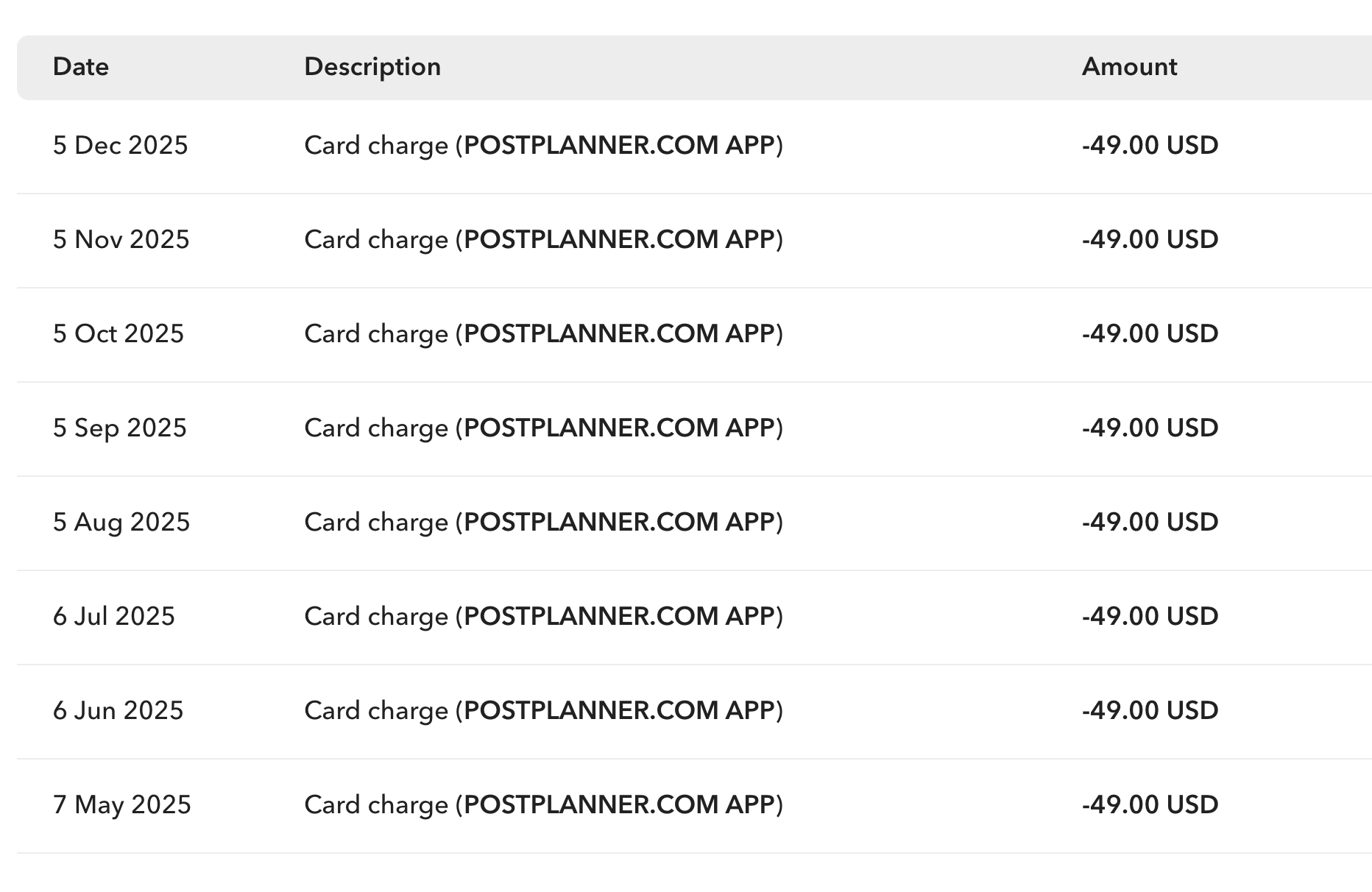
I tried to find more transactions to show that I’ve been using it for the past two years, but these are the only records I could find for now. Back then, the Growth plan was $49/month.
But before publishing another post, I often wanted to check how previous posts linking to the same article had performed.
Not just how many likes they got. How much traffic did they send to my website?
Answering that meant opening GA4 and checking manually. I was paying for scheduling, using another tool for competitor research, and still doing the traffic analysis myself.
That is why I started building Insight Hive.
I’m its founder, so this is obviously not an independent review. But I have used both tools in my own publishing work, and I can explain what I kept from the Post Planner approach, what frustrated me, and why Insight Hive now fits my workflow better.
If you are researching Post Planner alternatives because you run Facebook pages that drive website traffic or earn through Facebook Content Monetization, this is the comparison I would have wanted to read.
What I liked about Post Planner
The bucket and posting plan concept was the best part of Post Planner for me.
I could organize content into buckets, set a publishing plan, and add posts to queues rather than choose a date and time for every individual post. Managing several pages becomes much less tedious when you work that way.
I liked the approach enough that it inspired the buckets and posting plans in Insight Hive. I didn’t want to replace a scheduling workflow that already made sense to me.
For the scheduling I do, the basic experience is not dramatically different. Both let me prepare content ahead of time instead of manually publishing throughout the day.
My reasons for leaving were mostly about the limits around that workflow and the work I still had to do outside the tool.
Why I started looking for a Post Planner alternative
I paid $49 a month back then for the Growth plan. My subscription had a total limit of 1,500 posts and a daily posting limit of 24.
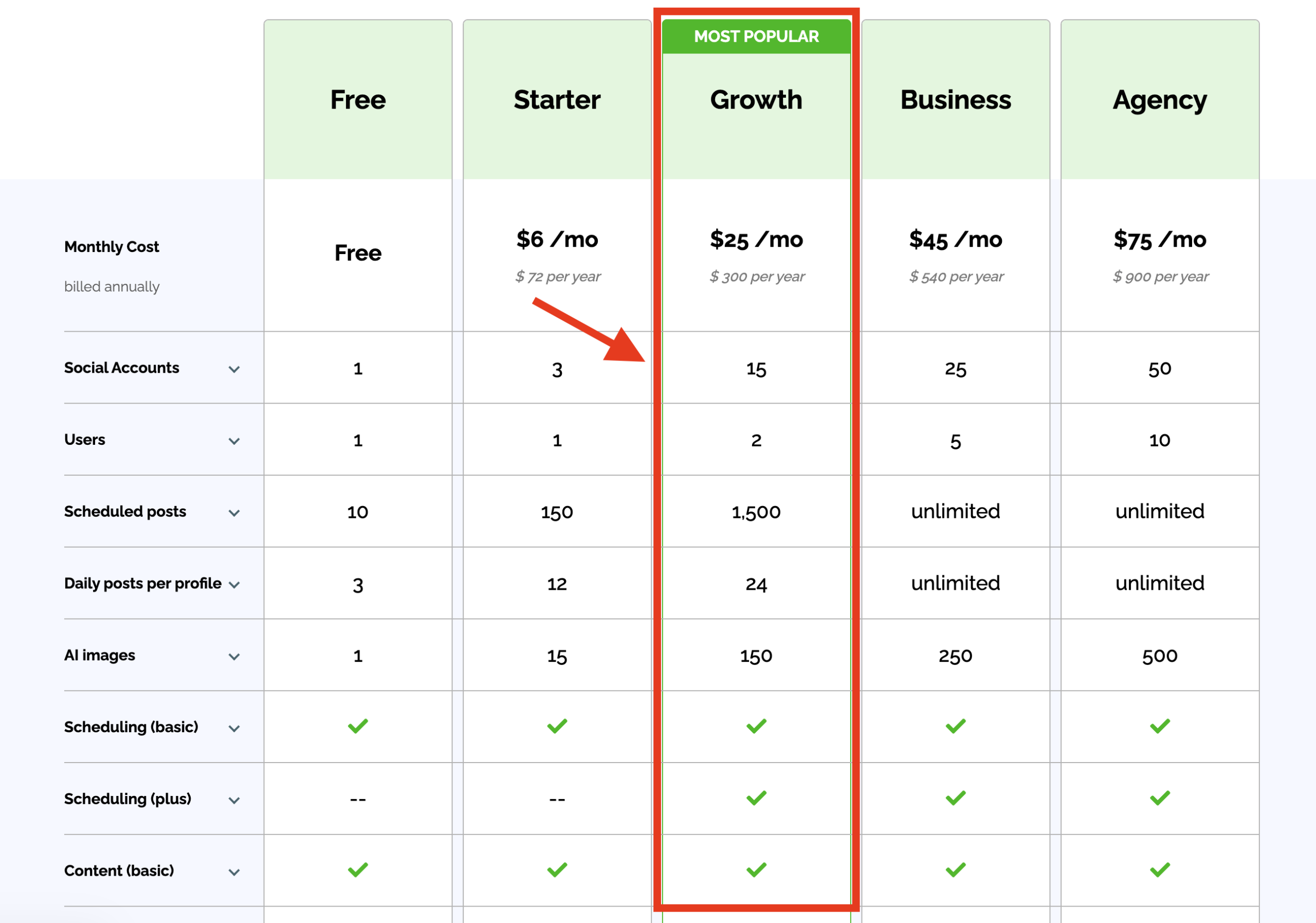
They have lowered the pricing recently I guess.
Those were the limits on the plan I used; check Post Planner’s current plans rather than assuming they are unchanged.
I now publish around 30+ posts daily with Insight Hive. A daily cap was an awkward restriction for the way I wanted to run my pages, and I didn’t like having to think about the total post allowance when preparing content.
The subscription cost also became harder to justify because Post Planner covered only part of my workflow. I was paying for Strevio for competitor research as well.
Post Planner did have a Content section for discovering things to share. I tried it, but the suggestions were not relevant enough to my niches, and I often couldn’t find enough useful material. I wanted to choose specific Facebook pages and study their posts, rather than depend on the suggestions available to me.
Then there was cancellation. When I canceled my subscription, I had to email support to request it. I found that unnecessarily annoying. I would much rather manage a subscription myself.
None of those things means Post Planner cannot work for someone else. The above explains why I no longer wanted to keep paying for it.
The feature I needed most was traffic per Facebook post
Before creating another post for an existing article, I like to look at what happened the last time we shared it.
Which format worked? Did the post attract comments but send very little traffic? Was a less popular-looking post bringing people to the website?
Post Planner showed performance numbers, but I found the analytics difficult to explore further. Sorting and filtering did not work the way I wanted for this kind of review, and I was still checking website traffic manually in GA4.
Doing that occasionally is manageable. Doing it as part of your normal publishing routine gets painful.
Post analytics is now the part of Insight Hive I use most. I can look at website traffic alongside likes, shares, and comments, then use that information when preparing the next batch.
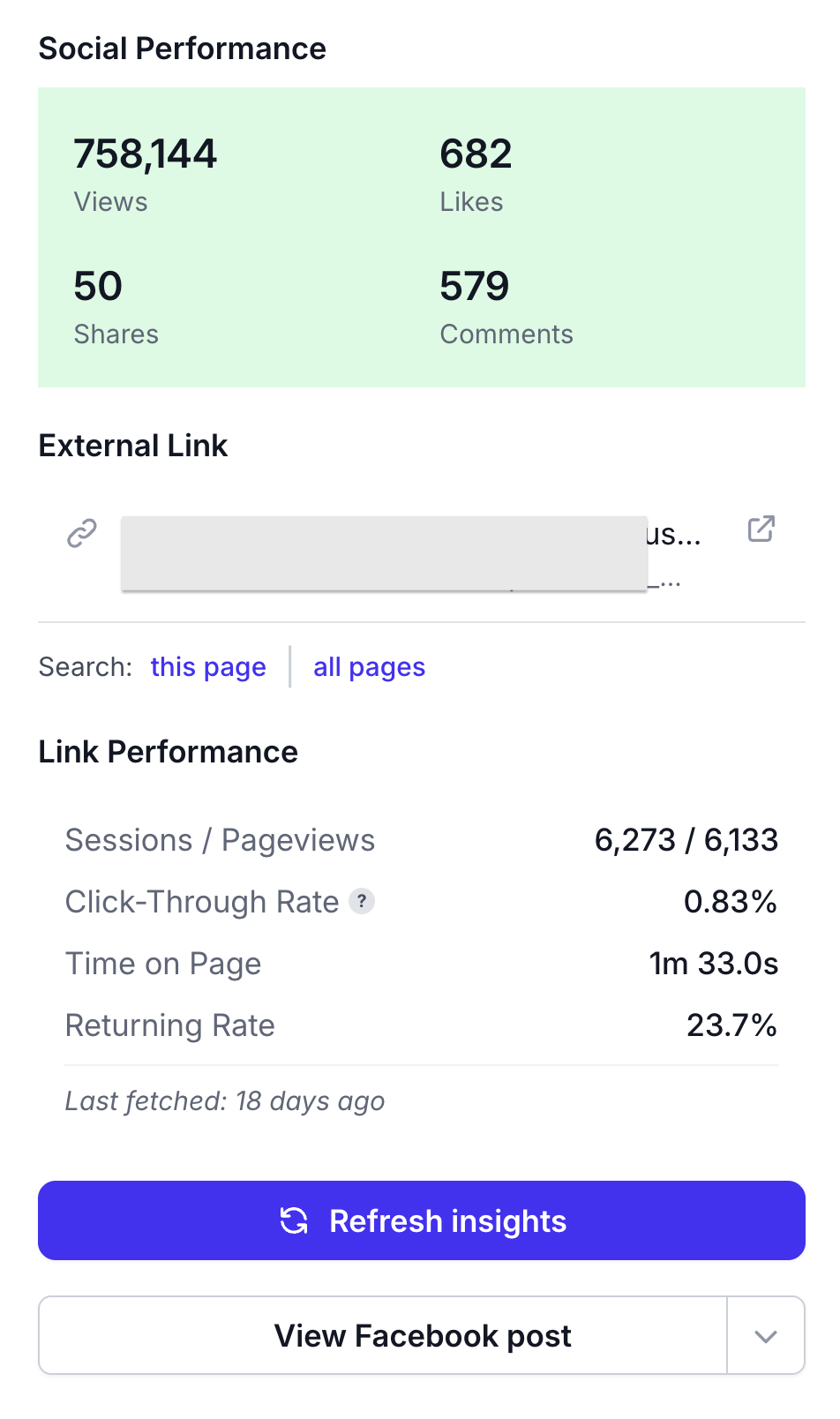
Insight Hive Post Analytics
One of my best traffic posts had around 3,000-plus likes but was credited with 136,000 website sessions.
That is the kind of result I want to find again. The likes alone would not tell me how valuable that post was for the website.
Insight Hive uses UTM information and link URLs to help attribute website traffic to Facebook posts. You connect your Google Analytics 4 account, associate your Facebook pages with the relevant GA4 properties, and the app fetches the traffic data daily.
I describe these numbers as attributed sessions, rather than a perfect count of every visit Facebook ever generated. The usefulness depends on the tracking information available. But having that information beside the post is much more practical for my daily work than repeatedly checking everything separately.
I also want to know what earns directly on Facebook
Website traffic is only one reason I publish.
If a page participates in Facebook Content Monetization, a post can also earn directly on Facebook. That is a different outcome, and I want to evaluate it separately.
Insight Hive shows Facebook Content Monetization earnings through Meta’s official APIs for connected pages where that data is available.
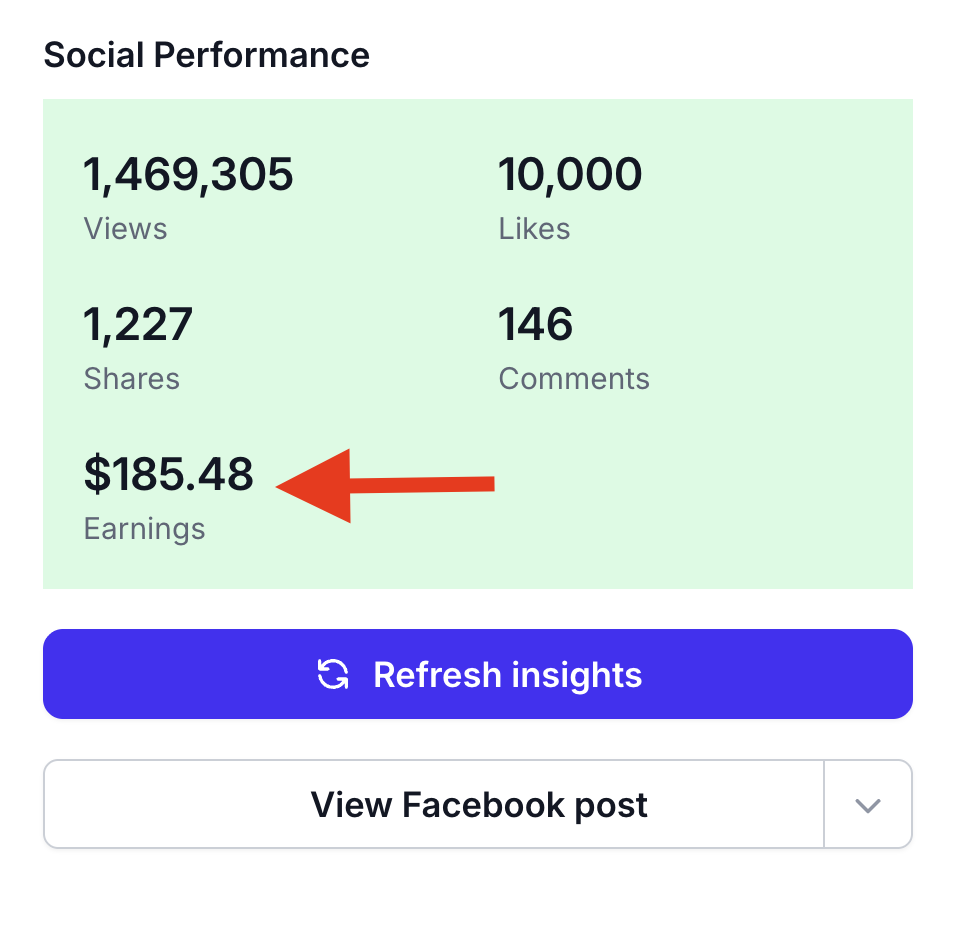
Insight Hive CM Earning in Post Analytics
This helps me decide what I am trying to improve. For some content, I care most about website sessions. For other content, Facebook earnings are the more useful result to study.
Engagement still matters, but I don’t want to treat it as a substitute for either of those numbers.
I’m not claiming that using an analytics tool automatically increases revenue. It gives me better information for deciding which posts and formats to try again.
Competitor research starts with the pages I choose
Post Planner’s content suggestions did not give me enough relevant ideas. In Insight Hive, I start with the Facebook pages I want to learn from.
I add those pages, pull the public posts available through Facebook’s official APIs, and sort by likes, comments, or shares.
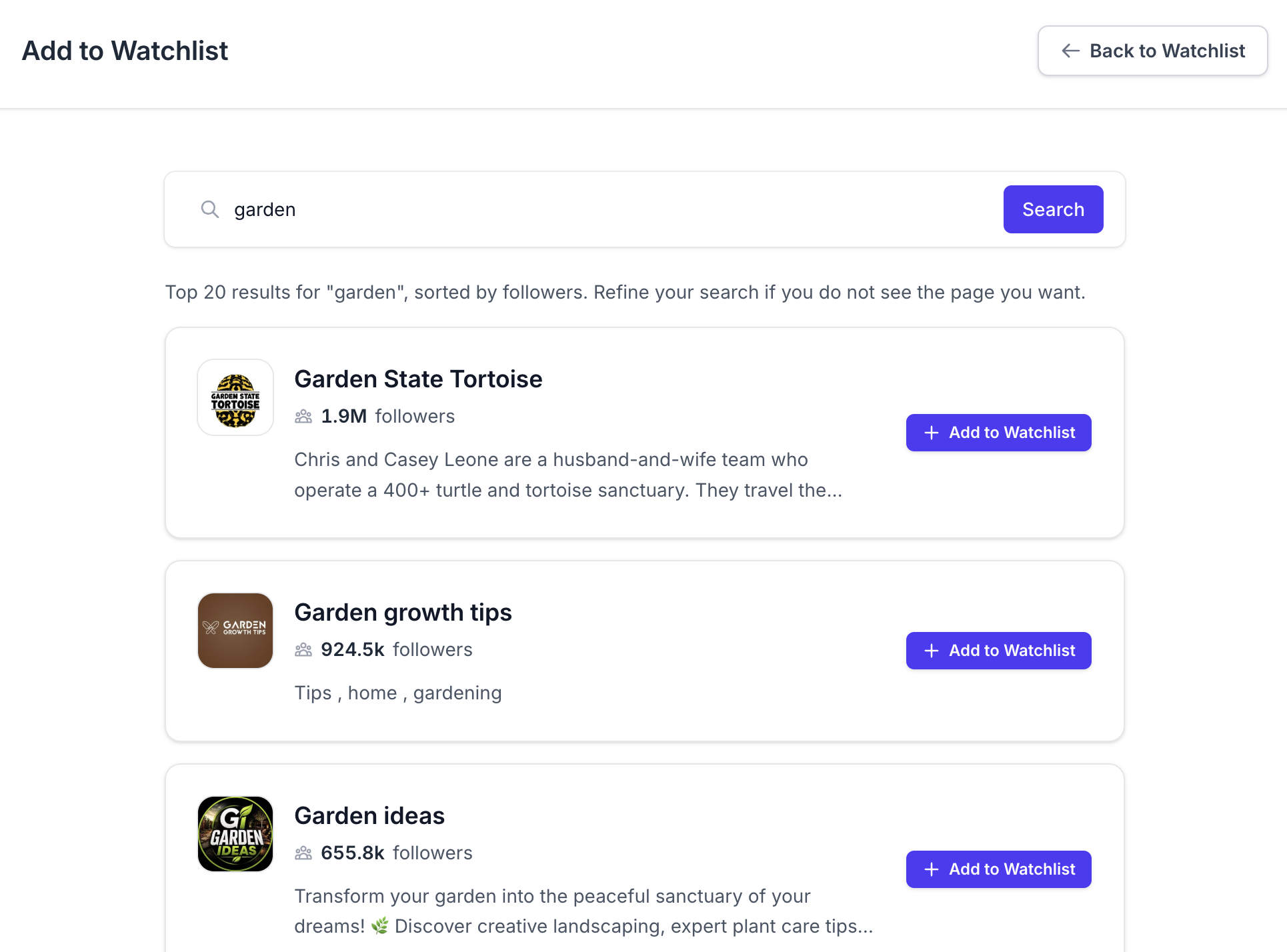
Add to Watchlist in Insight Hive app
That lets me study what is working in the niches I publish in. I can look at the topics getting attention and the formats those pages are using, then decide whether there is a useful idea for my own audience.
I don’t know which underlying sources Post Planner uses, so I won’t speculate about that. The difference I notice as a user is that Insight Hive lets me direct the research toward specific pages.
There is also an important distinction between my own analytics and competitor research: public engagement does not reveal another publisher’s private website traffic or earnings. I use competitor posts for ideas, not as proof of how much money another page makes.
I kept the scheduling features I already relied on
After checking performance and researching ideas, I still need to get content published.
I use Insight Hive to bulk schedule posts across my pages, organize them into buckets, and let posting plans handle when they go out. First comments with links, along with delays for posts and comments, are also part of my routine.
Insight Hive does not impose the daily posting cap I had on my Post Planner subscription (24 posts daily only). Facebook’s own platform restrictions still apply though.
I have been using Insight Hive for around a year and currently manage up to ten pages with it. The scheduling is useful, but the reason I prefer this setup is that I can review earlier posts and research new ideas in the same app I use to prepare the queue.
I spend less time trying to piece together the information I need before scheduling.
What Insight Hive costs and who it fits
Insight Hive currently has two plans:
- Basic: $19 per month, with five owned Facebook pages and 15 competitor pages.
- Pro: $39 per month, with 15 owned Facebook pages and 45 competitor pages.
There is currently no free plan or free trial.
Basic has a lower entry price, but it would not cover my ten-page setup. Pro is the relevant plan for that number of pages, so I would not present the comparison as simply “Insight Hive is cheaper than my old Post Planner subscription.”
For me, the value is in getting scheduling, post analytics, website-traffic reporting, and competitor research together. Whether that works out better for you depends on the pages you manage and the other tools you would otherwise pay for.
Insight Hive is optimized for Facebook. That is deliberate, and it is also a limitation.
If you need one tool to manage a broad mix of social networks, I would compare those requirements carefully before switching. And if you are happy with Post Planner’s scheduling and content suggestions, with no need for deeper Facebook publishing analysis, you may not have the same reasons to leave that I did.
Why I use Insight Hive now
I didn’t leave Post Planner because I disliked scheduling with buckets and plans. I kept that approach.
I wanted to check how earlier posts performed before sharing an article again. I wanted website sessions next to Facebook engagement, earnings where available, and a way to research the specific pages I follow in my niches.
Those are the things I now use Insight Hive for every day.
If that sounds like your publishing routine, take a look at Insight Hive. It is the Post Planner alternative I built around the work I was already doing.
How I schedule and analyze our Facebook posts
I used to pay for two tools: one to schedule posts and another to see what actually worked. It was expensive, messy, and neither was really built for Facebook pages. So I built my tool that does both, properly, in one place: Insight Hive.